
PREBUILT PLUGINS

A faster path to compliance through supported plugins

Let your existing tools support compliant invoice flows faster with ready-made integrations - without building a custom API connection from scratch.

Activate plugins

How to

Make your existing invoice flows compliant - fast

01 Choose the right plugin

Select the integration that fits your system and use case.
Install the selected pre-built integration to connect your existing system to DDD.

02 Install

Install it through the relevant marketplace or plugin entry point.
Configure the pre-built integration and invoice flow settings in DDD.

03 Configure

Complete the required setup with the help of our How to Guides
Compliance enabled through the pre-built integration after setup and configuration.

04 Compliance enabled

Your current invoice flow stays in place, while DDD handles the compliance layer behind it.

Choose the plugin that fits your current system

Keep your current setup. Add the compliance layer around it. Explore our premade plugins:

Connect multiple plugins and keep invoice flows in one view

Use more than one plugin and manage invoice visibility either in one consolidated view or filtered by source.
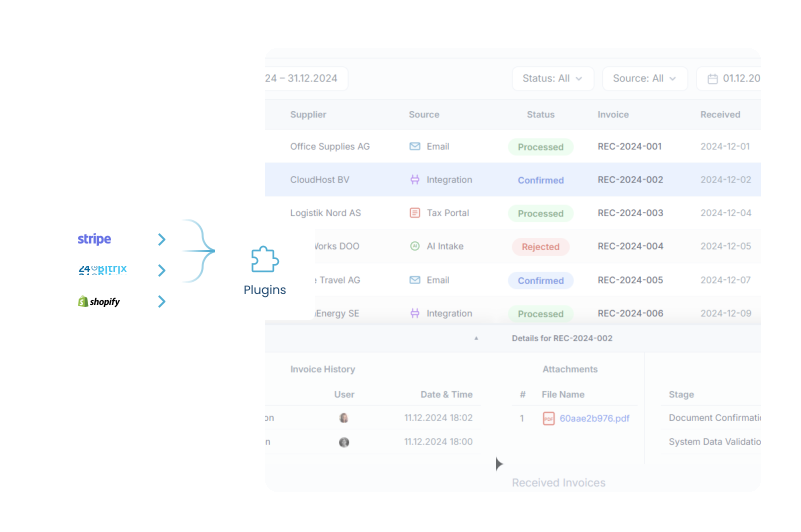
  • Connect multiple plugins
  • See invoices in one view
  • Filter flows by source
Multiple plugins connected in one invoice flow view

Need a plugin that is not listed?

If your system is not yet available as a prebuilt plugin, request it and we can evaluate it as a future integration path.

Talk to us

USE CASE

This is how it's done.

Video Thumbnail

FAQ

Frequently asked questions

Prebuilt integrations are ready-made ways to connect supported systems to DDD Invoices without building a custom API integration from scratch. They are built for teams that already use a supported platform and want a faster way to connect their existing invoice flow to DDD's compliance infrastructure.
Prebuilt integrations are best for teams that want to start faster and avoid a full custom API project. They make sense when your invoicing already happens inside a supported platform and you want DDD to process invoices for compliance without changing your whole invoicing setup.
Yes. A prebuilt integration reduces the integration work, but it does not remove the need for setup. You still need to connect the plugin or integration, check the required settings, configure the right workflow, test the invoice flow, and move to production when everything works. The difference is that you are not starting from a blank custom API integration.
Yes. Testing is part of the setup. Before sending real invoices, you can test whether the invoice flow works correctly through DDD. This helps you catch missing settings, wrong configuration, or missing invoice data before the production flow is activated.
Once the test invoice works, the setup has been validated. The next step is to choose the right package, activate production, and start sending real invoices through the live flow. At that point, DDD stops being just a setup step and becomes part of your operational invoice process.
If a test invoice fails, something in the setup needs attention before going live. The dashboard should show what needs to be checked or fixed. This is why test mode matters: it helps you solve setup issues before real invoices are affected. If the issue is unclear, you can use support to resolve it before moving forward.
The API is for teams that want a custom, flexible integration directly into their own software or internal systems. Prebuilt integrations are for teams that want a faster path using an already supported platform. Both connect to DDD's compliance infrastructure, but the API gives more control, while prebuilt integrations reduce the amount of custom work needed to start.
Yes. The dashboard gives you visibility into the invoice flow after the integration is connected. You can use it to check invoice statuses, follow what happened with a document, and see whether something needs attention.
Because compliance should not become another manual process your team has to monitor every day. A prebuilt integration helps you connect your existing invoice flow to DDD faster, so you can move from setup to production with less technical work and more visibility over what is happening.