Introduction
With DDD Invoices e-invoicing infrastructure, your invoice/billing/transaction data can be:
1. On the issuing/outgoing side:
- transformed into locally specific e-invoices (.XMLs), PEPPOL e-invoices, localized PDFs, fiscal PDFs (PDFs with QR code)
- distributed to the tax authority portals (TAP), via PEPPOL network, sent directly to the business partner via DDD Invoices infrastructure or delivered via email.
2. On the receiving/incoming side:
- pulled/received from various country tax portals, email servers (OCR and AI processing), received via PEPPOL network or via DDD infrastructure
- pulled/pushed into your software (with original .XML / PDF documents as attachments).
Data and the documents can also be stored on e-archive, on a certified and secure cloud systems to comply with local e-invoicing archiving requirements and e-sign documents.
All this, while you always work with a unified, globally standardised .JSON format, so you never have to deal with complexity of .XMLs e-invoices or government regulations again and we continuously maintain the compliance for you.
See our public API playground for the main invoice data API DDDI_Save.
We provide an interactive dashboard for integration purposes and daily checking of invoice flow in relation to the tax portals and business partners. Start the registration here.
Glossary:
- TAP = tax authority portal
- IE = Issued e-invoices
- REI = Received e-invoices
Technical Overview
Requests to the service are generally sent in the following form:
curl -X POST https://app.dddinvoices.com/api/service/EUeInvoices.<api-name> -H "Authorization: IoT <connection-key>:EUeInvoices" -H "Content-Type: application/json" -d "<json-data-object>"Note that all double quotes in the data object must be escaped (add \).
Authentication/Authorization
All requests sent to our servers must use an encrypted connection (HTTPS) and include the following HTTP header:
Authorization: IoT <connection-key>:EUeInvoices
The <connection-key> is a unique identifier of a legal entity registered on our infrastructure, by which you tell the APIs for which legal entity you are adding/modifying/deleting the data.
You have two connection keys, which can be found on the dashboard, and they should be used accordingly.
The first key is the TEST connection key, which can be used to interact with the test environment for implementation purposes.
The second key is the PRODUCTION connection key, which you obtain when you switch to one of the production plans. This key will allow you to interact with the production TAP environment.
Making API requests
General request to the service is in this form:
curl -X POST https://app.dddinvoices.com/api/service/<api-name> -H "Authorization: IoT <connection-key>:EuEInvoices"-H "Content-Type: application/json" -d "{<parameters>}"Note that all double quotes in the data object must be escaped (add \).
Main API
DDDI_Save is the main API for invoice data transfer to us, for which this public API playground is prepared.
Try DDDI_Save right now
Run a real request against our sandbox. Pick a country, edit the invoice fields, and see the actual response. No registration required.
This API sends the data to the platform in a standardised .JSON format where:
- parameter Object defines the content of the invoice,
- parameter Steps delivers the data to the various delivery channels (tax authority, Pepppol network, email etc.)
- parameter ReturnDoc gives back the desired document/invoice (XML, PDF with proof data etc.)
Go here to learn more about the main api DDDI_Save.
For software providers / platforms
Since the assumption is that you are primarily solving your end-clients invoicing (you can still solve your own invoicing - as one of your customers), we advise you integrate a couple of additional APIs, to make your life more automated and provide good UX.
Apart from DDDI_Save, the additional API needed is AddCustomer (to register end-clients on our platform and obtain the connection key), so you can then submit/obtain invoices in their name.
Go under the section for Software Providers to obtain the whole flow.
Versioning
Our API typically does not undergo any major versioning or breaking changes due to the structure of the API.
99% of all government changes are handled in the back-end, by our infrastructure.
If the APIs require a new breaking change, we’ll notify you at least 8 weeks (2 months) in advance. If there is just a need to change or add any required data in the input object , we will notify you at least 6 weeks in advance.
Idempotency
Idempotency is solved with the step number (from parameter Steps).
A step that has already been executed will never be executed again automatically.
You can modify the invoice by sending it to the DDDI_Save (after the first request, you send the request with the same “Invoice Id”, as many times as you want, but once you confirm & lock invoice data (Step 35), you can only send higher steps (further steps); all lower or equal steps to the current one are blocked.
When it comes to submission to the tax authority portals - if we receive an ERROR from the government portal (tax authority is down or similar etc.), we provide the ERROR in the API response and you should re-submit the request with the Invoice Id and the appropriate step.
Standard responses
A typical response from the REST API looks like a double wrapped standard response.
{
    "Status": "OK", //response of server that auth are ok, and that extension is found and has been executed.
    "Result": {
        "Status": "Error", //response of extension, that describes an error on step 70
        "Step": 70,
        "Reason": "'Invoice' object was expected to contain a document URL, but was not found under expected name 'XMLSpecific'.",
    }
}
The red part provides the status about technical information and the green part provides status about content information:
{
"Status": "OK", //response of server that auth are ok, and that extension is found and has been executed.
"Result": {
"Status": "Error", //response of extension, that describes an error on step 70
"Step": 70,
"Reason": "'Invoice' object was expected to contain a document URL, but was not found under expected name 'XMLSpecific'.",
}
}
This response is returned when the e-invoice has been sent to the Tax Authority Portal at Step 70 and is still being processed there:
{
  "Status": "Pending",
  "Step": 70,
  "Reason": "Tap deployment is pending. Invoice is being processed by TAP. Try again later.",
  "Result": {
    "TAP_SellerInvId": "5036453581",
    "TAP_BuyerInvoiceId": "5036453581",
    "Id": "b3e1fc8a-c962-11f1-abfe-a6dd408b8e08"
  },
  "ResultType": "Custom",
  "Id": "b3e1fc8a-c962-11f1-abfe-a6dd408b8e08",
  "ReturnDoc": {
    "PDF": "https://app.dddinvoices.com/Public/5c7bae32-6506-4914-982d-907a6b02c87d?inline=true"
  },
  "dd": {
This response is returned when potential problems are detected while generating the country-specific e-invoice (XMLS) at Step 50:
{
  "Status": "Warning",
  "Step": 50,
  "Reason": "One or more potential problems have been detected during generation of XML document. See Details.",
  "Result": {
    "XMLSpecific": "File/f9946c64-1151-4c56-98f0-c73a21b1db05?inline=true",
    "Id": "a3e94a97-cbaa-11f1-abfe-a6dd408b8e08"
  },
  "ResultType": "Custom",
  "Id": "a3e94a97-cbaa-11f1-abfe-a6dd408b8e08",
  "dd": {
    "writeStatus": true
  }
}
Status
Response status. Its string represents enum value.
- OK: API successfully completed. Result and result type are defined.
- Warning: API successfully completed, but with some warnings. Result, result type and reason are defined.
- Error: API didn't complete. Reason is defined.
- Pending: The request is a longer async running task. (e.g. slow responses from tax portals about the status of invoices)
Reason
- Reason for warning or error.
Result
- Result of the api call completed / finished successfully (status = OK), or partially (status= Error, Pending or Warning)
ResultType (Optional)
Defines type of result and is represented with string value of enum Custom, Invoice, InvoiceOnly, Registration.
- Custom: Contains key value pairs that are consistent with fields in invoice entity (e.g.: Id).
- Invoice: A standard Invoice object that includes Object Info and .JSON schema of the Invoice object (Only with DDDI_GetNew)
- InvoiceOnly: A standard Invoice object.
- Registration: API DDDI_AddCustomer returns this one.
In practice about statuses:
- DDDI_Save status: When you post an invoice using DDDI_SAVE, you receive the initial status response directly in the API response. You can see an example of the response structure in the API Playground.
- DDDI_Status: You can call the DDDI_status auxiliary API at any time to retrieve the latest status of a specific invoice. This also includes statuses received from the Tax Authority Portal, such as whether the invoice has been approved or rejected. The API provides two status levels:
- Step Status – the current status within the DDD processing flow.
- TAP Status – the current status received from the Tax Authority Portal.
- Push notifications: If preferred, you can also create a push API endpoint / webhook in your Shared Service Center. DDD can then automatically send status updates to your system whenever the invoice status changes.
Switching to the production environment
You can switch any legal entity to the PROD environment in the Operation Mode menu (and via API DDDI_ChangeModeToProd and DDDI_ChangeModeREI (for software providers))
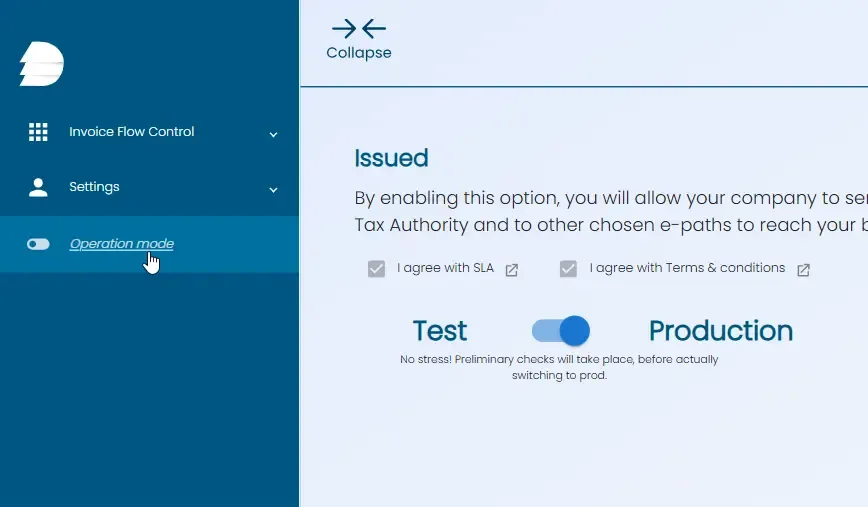
You’ll receive a TEST API key next to the API key that was now switched to the Production. TEST API key is always in TEST, used for later testing.